Configure default taxes
Settings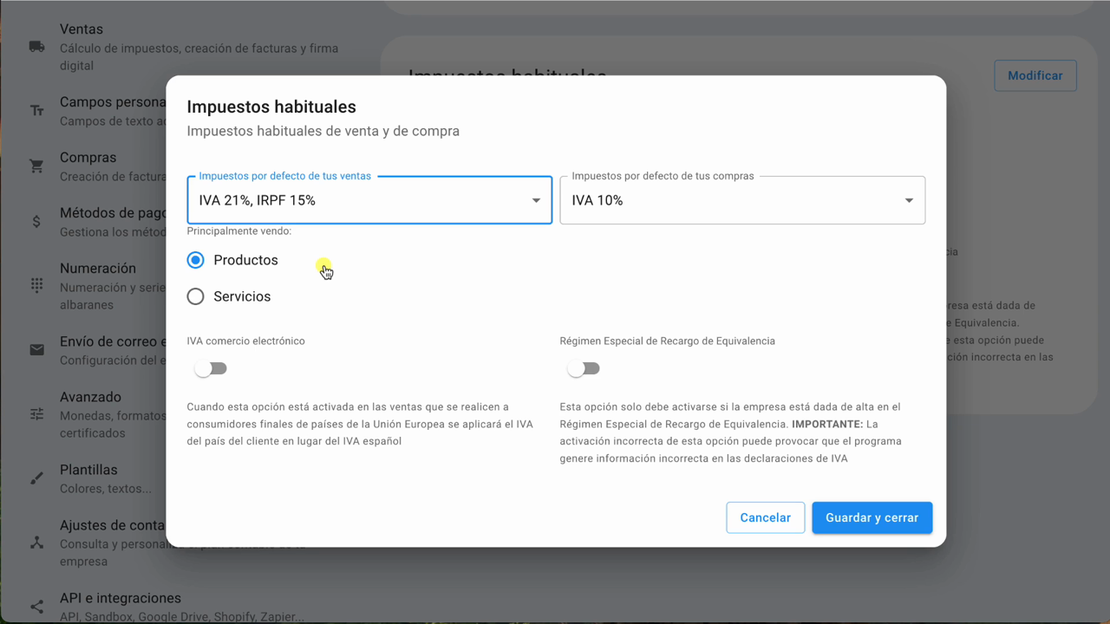
Configure the usual sales and purchase taxes, intra-Community operator registration and the values applied to new documents.
In this video, we show you how to configure intra-Community operator registration and the usual sales and purchase taxes. You’ll also see which tax options to review and how these values apply to new documents, including the priority of taxes set in each customer record.
Video transcript
In this video, we'll configure your usual taxes and registration as an intra-Community operator. It's very simple and will get the app ready for your day-to-day work. Let's get started. Go to Ajustes, then open Impuestos. You'll see two sections: Operador intracomunitario and Impuestos habituales. Let's start with the intra-Community operator.
If your business is already registered with Registro de Operadores Intracomunitarios, click Modificar and enable registration as an intra-Community operator. FacturaDirecta will display your intra-Community NIF using the country and your business's NIF. Check that the details are correct and confirm the changes.
From now on, when you create intra-Community invoices, your intra-Community NIF will appear. If your business isn't registered in this registry, leave this option disabled. Now go to Impuestos habituales and click Modificar. Under Impuestos por defecto de tus ventas, open the selector and choose the taxes you use most often on sales invoices, quotes and delivery notes.
You can combine taxes from different groups, such as IVA and IRPF. Within the same group, choose the type you usually use. If your plan lets you record purchases, also configure the default taxes for your purchases. Choose the taxes you normally use on purchase invoices. Then state whether your main activity is selling Productos or Servicios.
If the options for e-commerce IVA or the equivalence surcharge appear, enable them only if they apply to your business's tax regime. Once you've reviewed all the fields, confirm the changes. From now on, FacturaDirecta will suggest these taxes when you create a new document. Before you finish, note one important detail.
The usual taxes we've configured are applied by default to new documents. But if you've set a customer's own default taxes, FacturaDirecta will apply that customer's taxes when you create an invoice for them. And you're done! Your taxes are now configured for day-to-day invoicing in fewer steps. Thanks for watching!